

Payroll
Payroll and Compensation
Open the month, approve the timesheet and run payroll: social security, income tax, stamp tax, deductions and employer cost appear line by line for every employee, and the payslip reaches them in one click.
What does it solve?
When payroll, timesheets and extra payments live in different places, the same data is keyed in every month and mistakes surface at month end. In NetKurum, timesheets, salaries and payment items flow into payroll from one database.
- Copying the timesheet by hand "Refresh all data" on the period screen fills the timesheet from leave records, public holidays and hire and exit dates; rows you corrected by hand are left alone.
- Rates and limits that change during the year Minimum wage, the SGK (social security) ceiling, tax brackets, exemptions and the severance ceiling sit in a yearly parameter table; the calculation engine has no hard-coded rates.
- Periods closed without checks A period cannot be finalized while any payroll is in error or not calculated. A finalized period is locked, and next month inherits its cumulative tax base.
- Payslips sent around by email Payslips are shared as records that cannot change. Employees open and acknowledge them on the web or in the mobile app, and you see when each one was viewed and acknowledged.
- Separate preparation for tax filing A finalized period gives you the MUHSGK (monthly withholding and premium return) preparation file, a schema-checked e-Beyanname XML, the bank payment list and the accounting voucher.
Payroll and compensation, screen by screen
These images are real screens from the NetKurum demo organization; names of people and companies are fictitious.
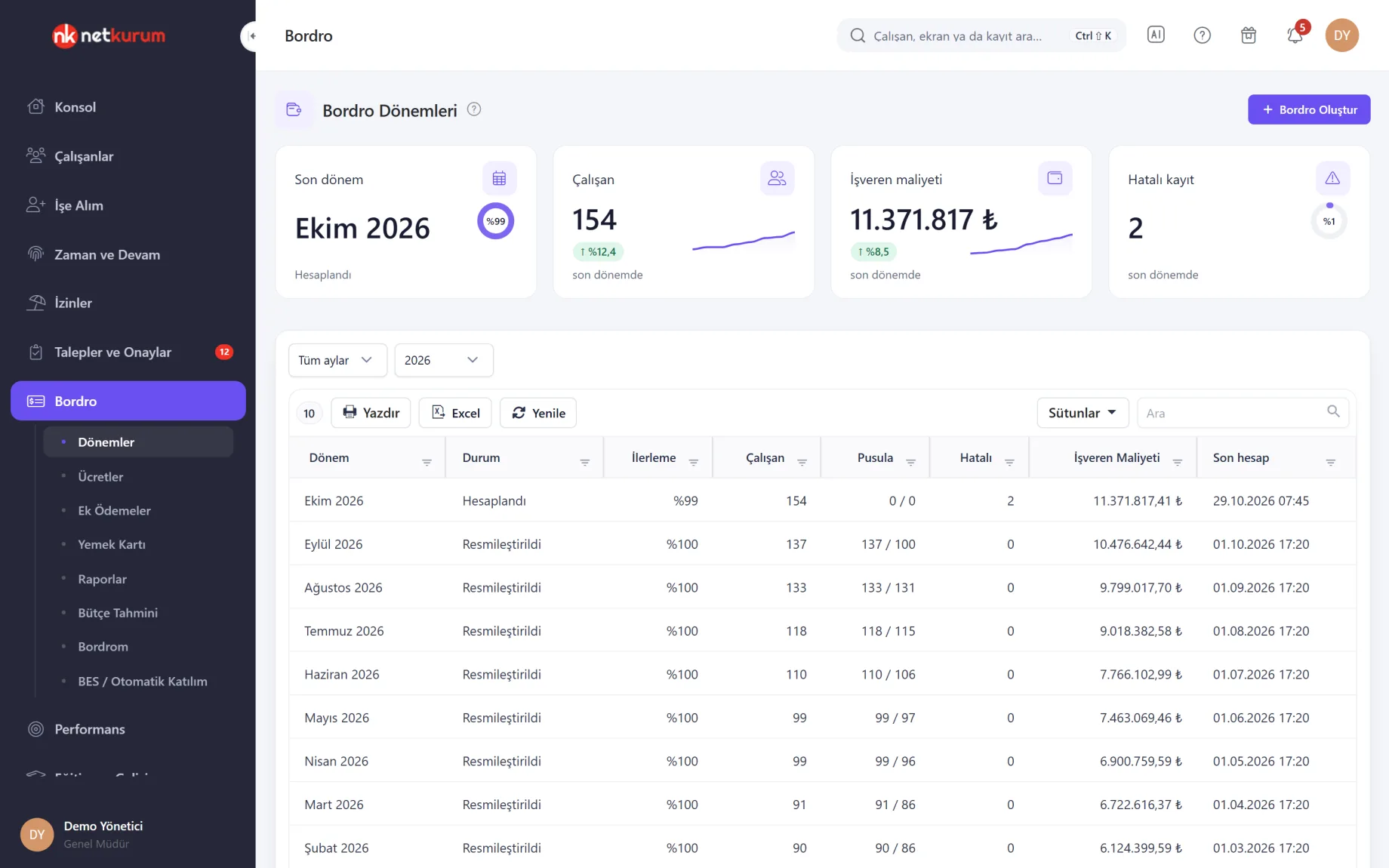
A period in five tabs
Payroll period
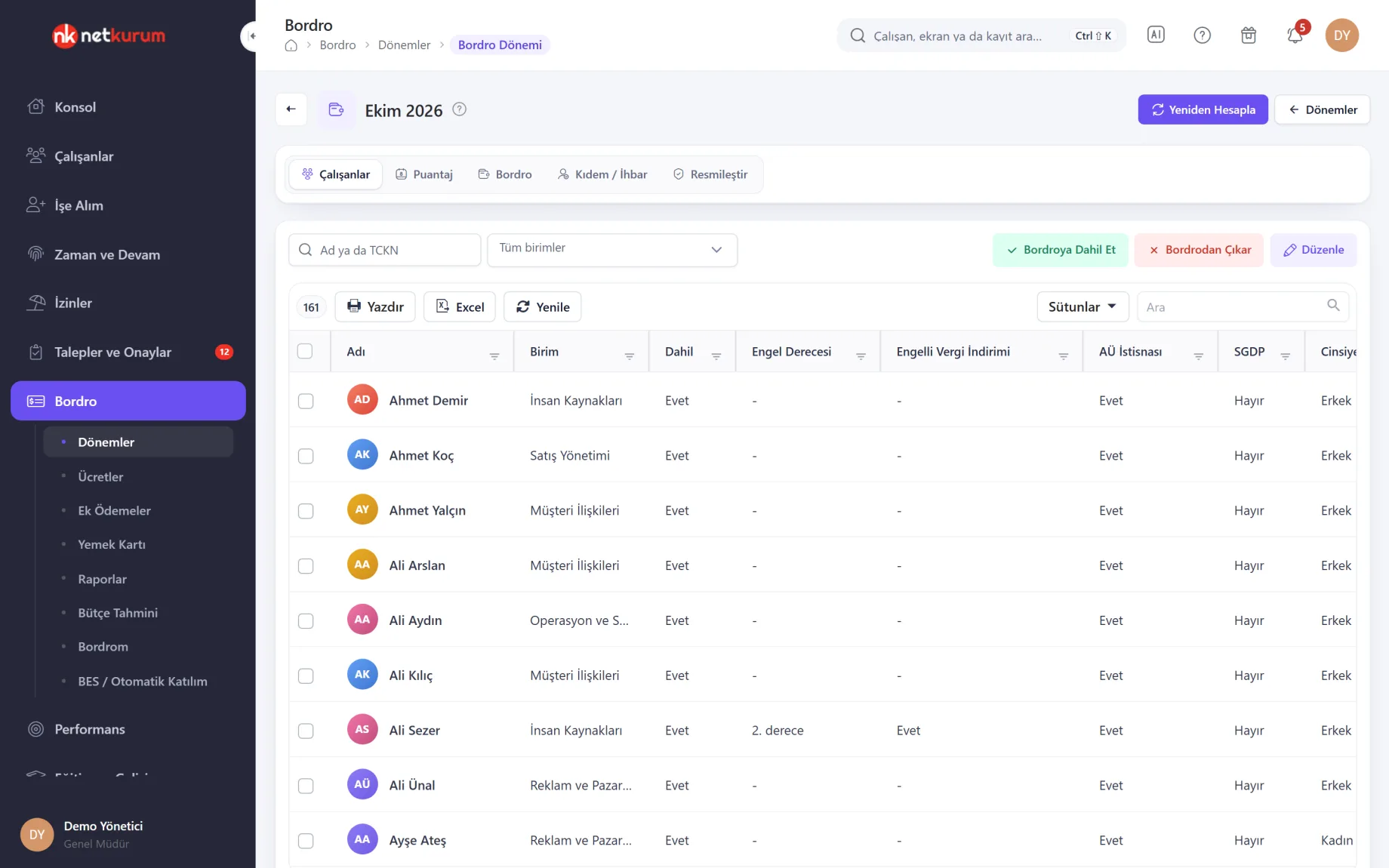
Each month moves through five tabs: choose employees, refresh and approve the timesheet, calculate, review, finalize. The Payroll tab shows earnings, social security, income tax, stamp tax, deductions and employer cost as column groups of a single table.
See details
Payroll cannot run before the timesheet is approved; a row whose data changed after calculation is flagged for recalculation.
On the Employees tab, the incentive law, SGK workplace, minimum wage exemption, SGDP (pensioner contribution) and overtime rule are edited per row or in bulk. The timesheet holds working days, weekly rest, paid and unpaid leave, sick days, missing-day reasons and three kinds of overtime hours.
Double-click a row to open the calculation breakdown and the payslip PDF. The full payroll sheet downloads as Excel and the summary report gives period totals. The Severance / Notice tab calculates severance pay, notice pay and unused leave for leavers by SGK exit code, gross and approximate net.
"Create payslip" saves the selected results as payslips that cannot change; with "Employee can see it" switched on, the payslip lands on the employee's My Payslips screen.
- Status: calculated, warning, error (with reason) or not calculated
- Lock: Finalize closes the period; Reopen when a fix is needed
- Output: full payroll sheet, summary and payslip PDF
Personnel data and salary history
Salaries and the payroll card
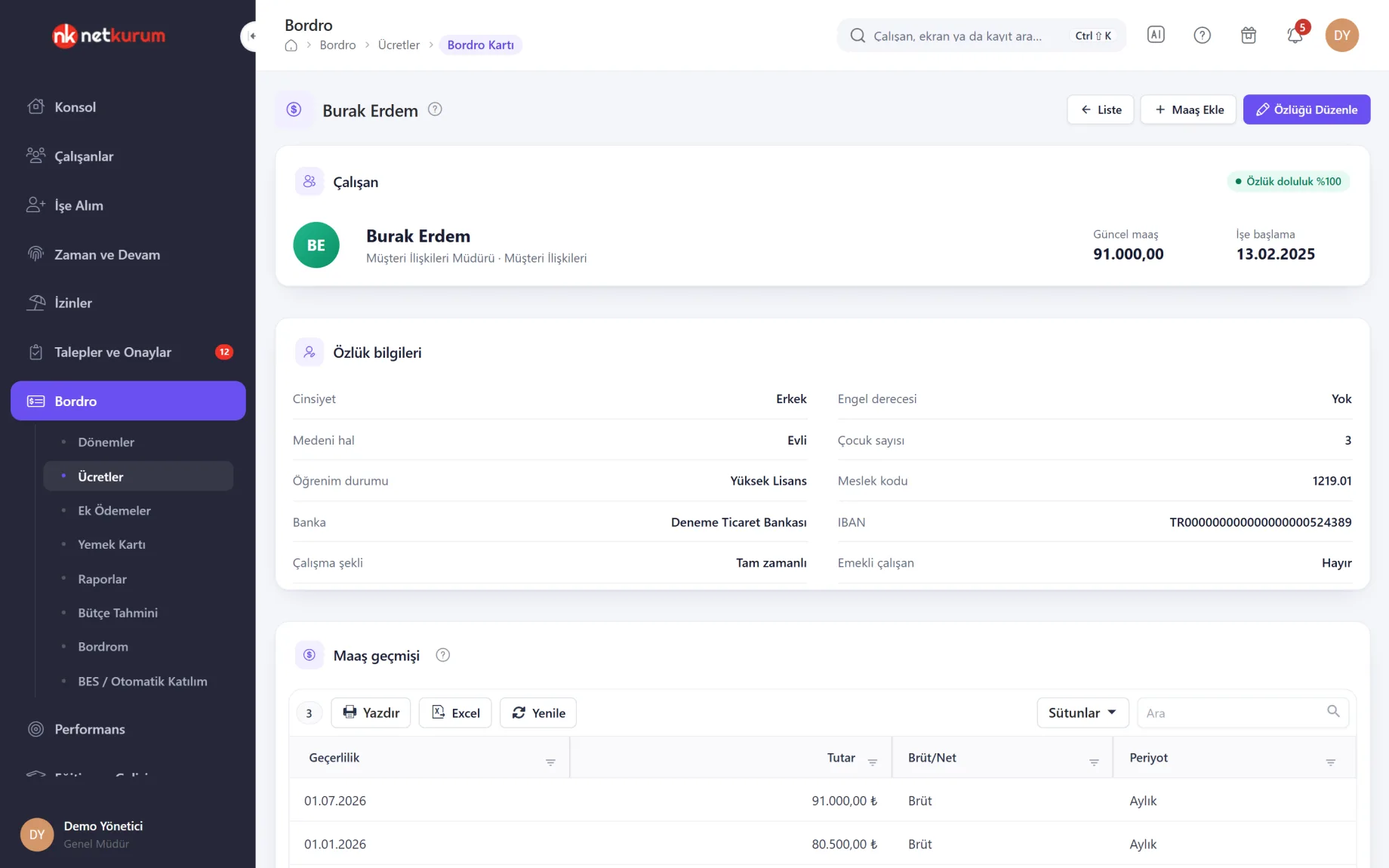
Each employee's payroll card brings together personnel fields, salary history, extra payments and special deductions. Salaries are entered with an effective date, gross or net, and yearly, monthly, weekly, daily or hourly.
See details
For a net salary, the gross amount is found with the real calculation, including cumulative tax base, exemptions and the ceiling.
The completeness rate in the card header shows missing fields; payroll expects at least 80 percent. A salary marked "minimum wage" updates itself when the minimum wage changes in the parameter table.
Salaries can be imported from an Excel template: the file is checked first, invalid rows are listed and only valid rows are saved. Existing salaries stay; the new row takes effect from its effective date.
- Salary: gross or net, five pay periods
- Bulk entry: Excel template, checked before import
- Interns: no social security deduction when the school registers them
Payment and deduction items
Extra payments and deductions
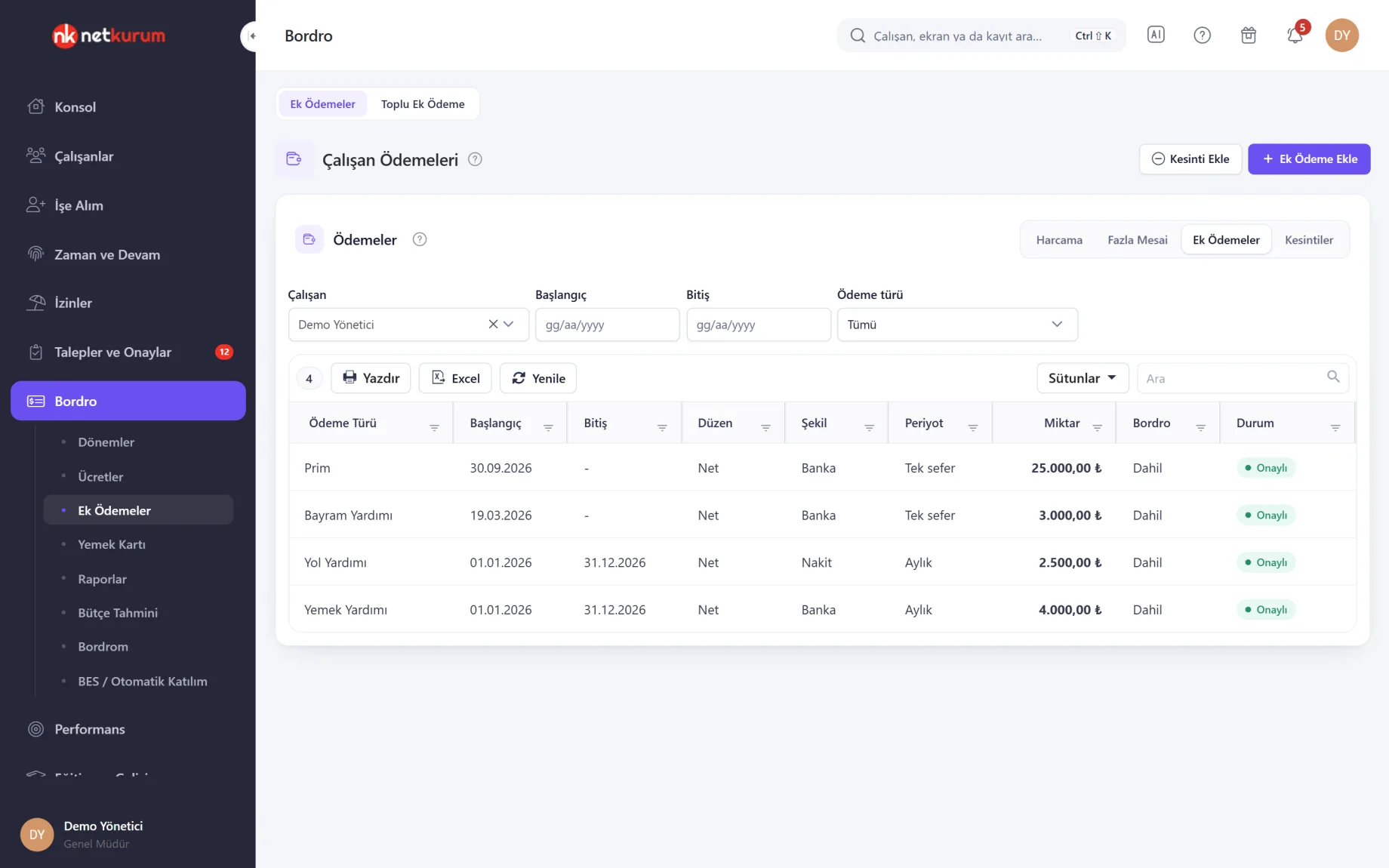
Bonuses, meal and travel allowances, childcare support and other extra payments, plus deductions such as advances, wage garnishments, alimony and pension contributions, are entered on one screen. Payroll reads every item marked "include in payroll" for the part that overlaps the period.
See details
This is the single source of payment items; nothing is keyed in again on the payroll screen.
Items are one-off, monthly or daily, net or gross; net extra payments are grossed up. The same item cannot be added twice for one period or dated before the hire date.
Bulk Extra Payment adds a bonus or allowance to up to 500 selected employees at once. Rules run per employee and the result explains any item that could not be added. A deduction larger than take-home pay is capped with a warning.
- Extra payment types: 25 types plus Other
- Deduction types: advance, pension, garnishment, work advance, alimony, union dues, private insurance, other
- Visibility: employees see their own items under My Payments (setting-dependent)
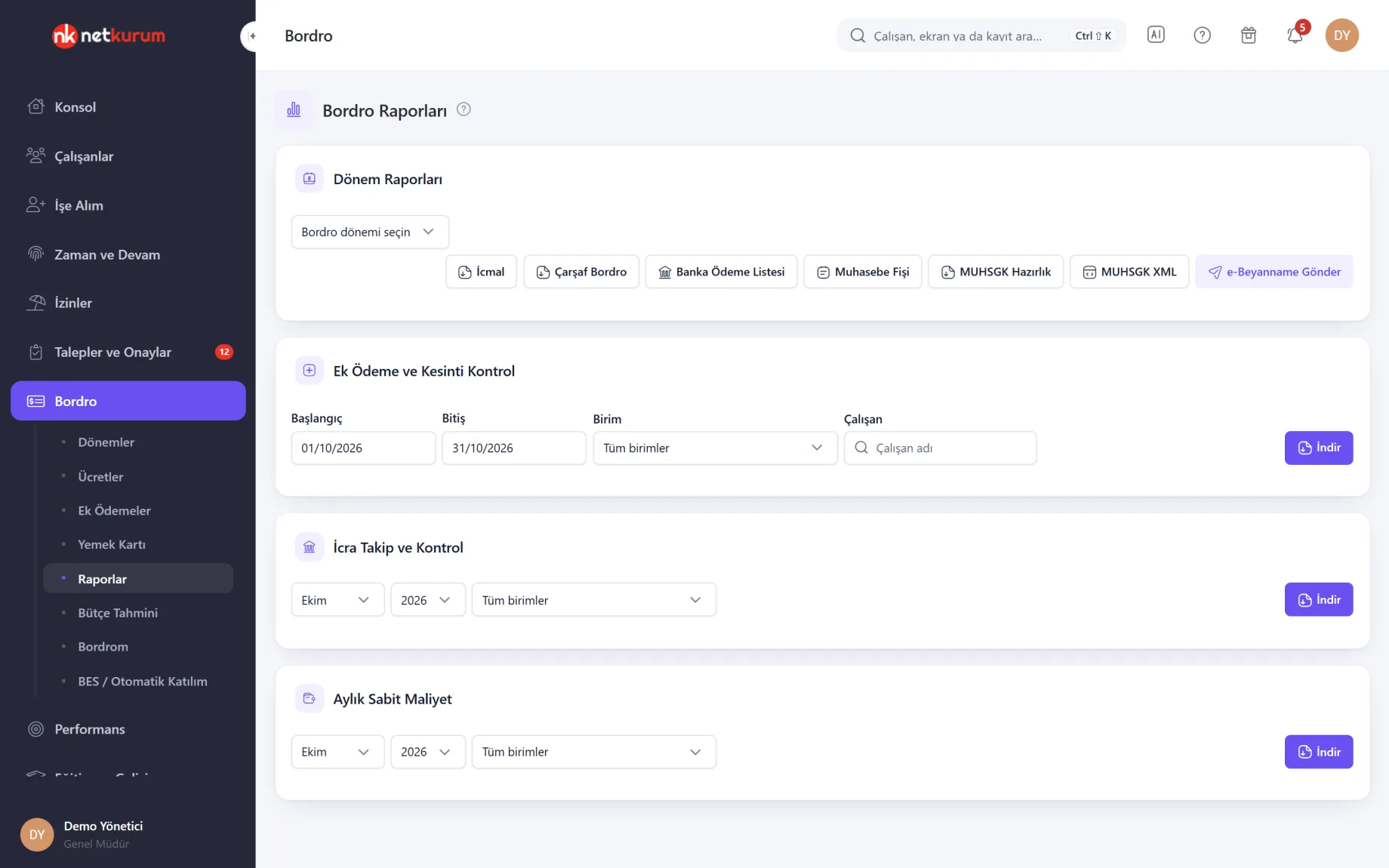
Period reports in one row
Payroll reports
Pick a period and download the summary, the full payroll sheet, the bank payment list, the accounting voucher and the MUHSGK preparation file. The same screen holds extra payment and deduction checks, garnishment tracking and fixed monthly cost.
See details
The bank list warns about missing IBANs; the accounting voucher is grouped by cost centre.
The extra payment and deduction check puts the amount entered next to the amount that reached payroll; its second sheet flags employees who accrued exactly the same overtime every month for 12 months. The garnishment report shows paid, remaining and period amounts.
The e-Beyanname MUHSGK XML is built from the finalized period and validated against the GİB (Revenue Administration) schema; if it fails, no file is produced and errors are listed by line. NetKurum does not submit the return: you or your accountant upload the file.
- Period: summary, full sheet, bank list, accounting voucher
- Filing: MUHSGK preparation file and e-Beyanname XML
- Checks: extra payments vs payroll, garnishments, fixed cost
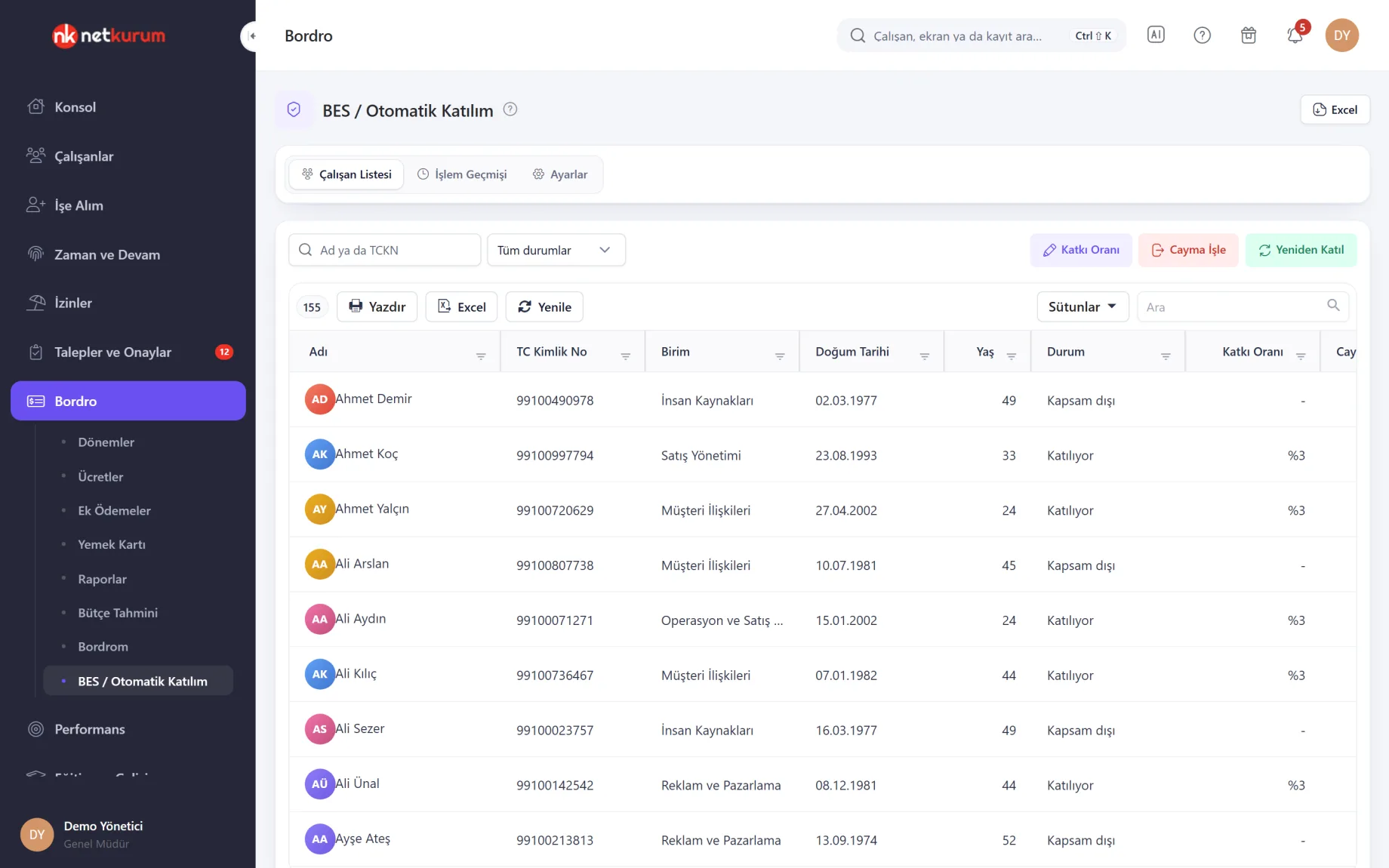
Coverage and contribution rate
Pension auto-enrolment (BES)
Employees within the auto-enrolment age limit are listed with the default contribution rate, and those outside it appear separately. Rate changes, opt-outs and re-enrolments are written to the activity history.
See details
The age limit and default rate come from the parameter table in Payroll Settings.
For someone outside the scope you can enter a rate and open a voluntary enrolment. The Settings tab keeps the pay day, the pension company and contact details for the accountant and insurance adviser.
This screen tracks rates and requests; the payroll deduction itself is the pension deduction on Employee Payments. Notifications to the pension company are not sent from this screen.
- Statuses: enrolled, opted out, out of scope
- Actions: contribution rate, opt-out, re-enrol
- Export: Excel
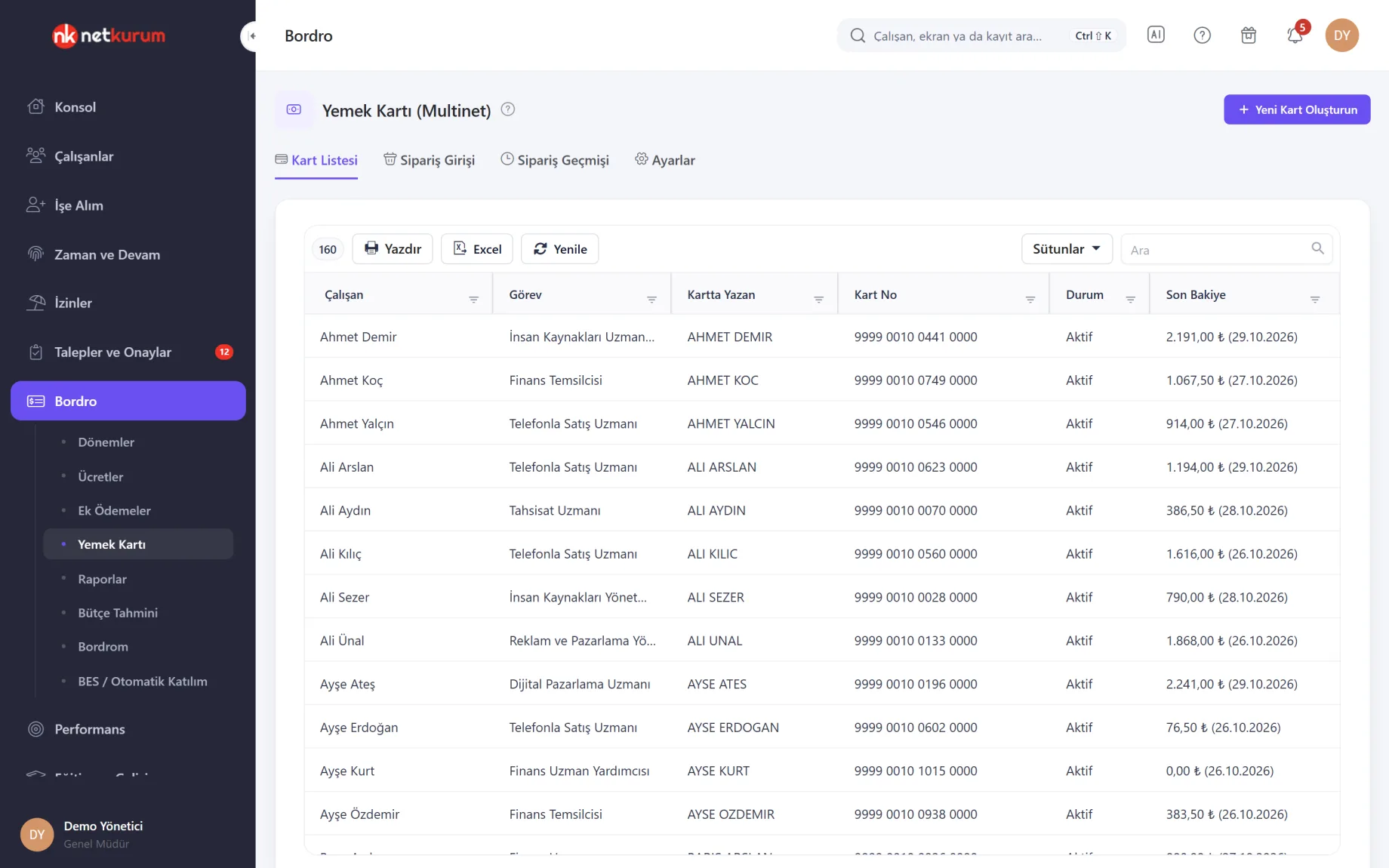
Cards and balances
Meal Card (Multinet)
Employees' meal cards are listed with card number, status and last balance. In Order Entry you choose the month and amount type (working days × daily amount, or a fixed amount) and build the monthly order for everyone with a card.
See details
Working days and meal amounts can differ per employee.
Saved orders go to the history. From a row you download the upload file (Excel) with card number, name, ID number, working days and amount, and upload it to the Multinet portal. Card, block and cancellation requests are tracked in a queue.
A direct service connection to Multinet is prepared and will open once Multinet's corporate employer API agreement is in place; today the upload is done with the Excel file.
- Tabs: card list, order entry, order history, settings
- Amount: daily amount or fixed amount
- Upload: Excel file to the Multinet portal
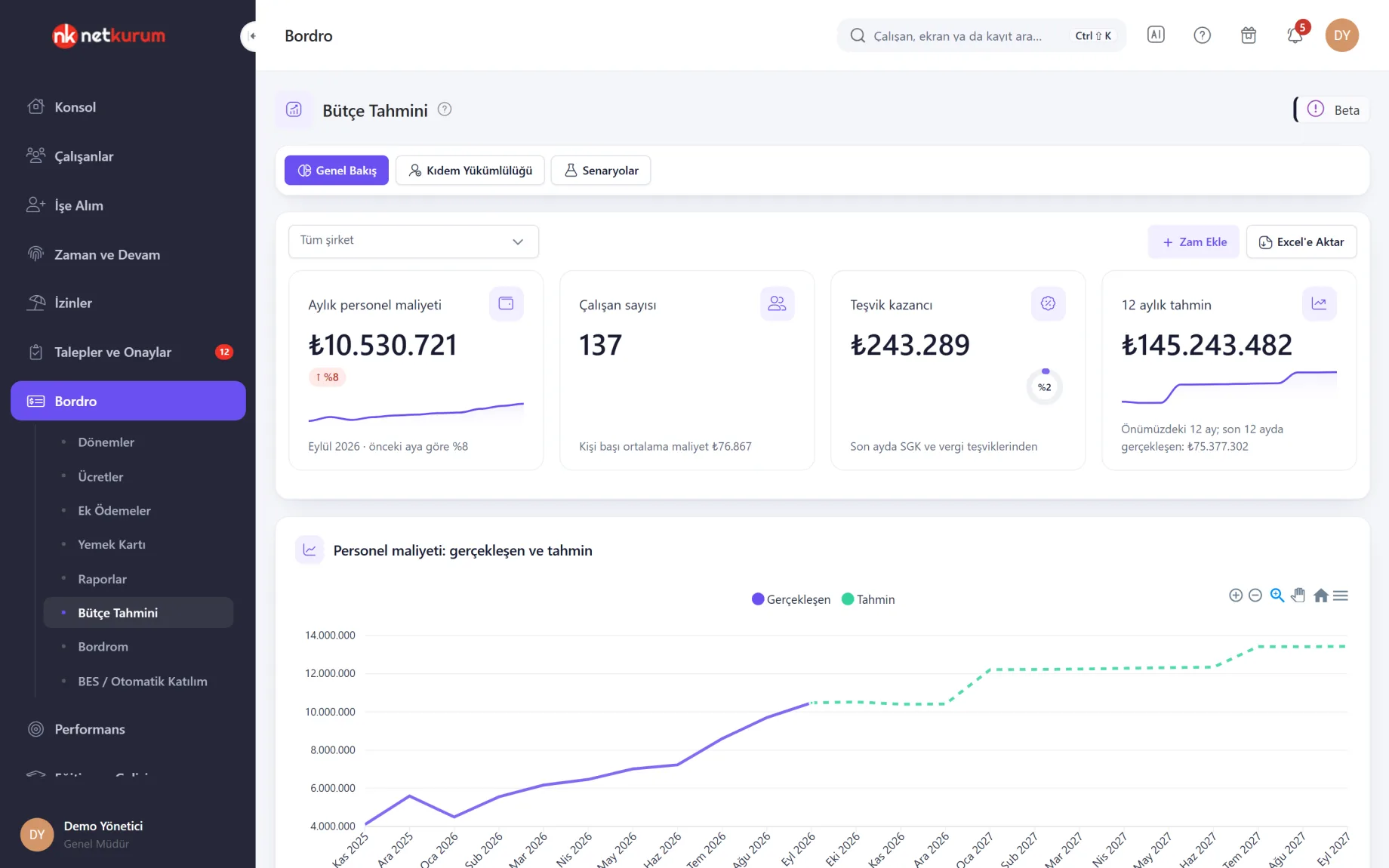
12-month cost forecast
Budget Forecast (Beta)
Starting from the last finalized payroll period, it forecasts personnel cost for the next 12 months, with salary increase assumptions, severance liability and "what if?" scenarios on the same screen. The screen is labelled Beta and only the account owner sees it.
See details
Increases and scenarios are calculated on this screen only; nothing is written to payroll or salary records.
The forecast adds, step by step, recorded exits, the cumulative tax base effect, minimum wage and SGK ceiling changes defined in the parameter table, and up to three increases you enter. Unannounced minimum wage increases are not included.
Scenarios combine exits, new hires, targeted raises, a new minimum wage and incentive changes, and up to three scenarios can be compared side by side. Values export to Excel as calculated figures.
- Tabs: overview, severance liability, scenarios
- Net cost: employer cost after incentives
What's included in payroll and compensation?
- Monthly payroll period: employee settings, timesheet, calculation, severance / notice and finalization
- Gross or net salaries, five pay periods and bulk salary import from Excel
- Incentive law per employee (5510, 6111, 4691, 5746, 14857 or none), SGDP and minimum wage exemption
- Overtime multipliers and employee-specific overtime rules
- Yearly statutory parameters; "Copy from year" for a new year, unverified values flagged
- Extra payments and deductions, bulk extra payments, instalment debts and garnishment tracking
- Payslips that cannot change, viewed and acknowledged on the web or in the app
- Summary, full payroll sheet, bank list, accounting voucher and MUHSGK files
- Pension auto-enrolment list, contribution rates and opt-outs
- Meal card orders and the Multinet upload file
- 12-month budget forecast and scenarios (Beta)
- SGK hire and exit notification service (switched on in Payroll Settings, off by default)
How do you get started?
- Enter official details In Payroll Settings, define the company title, SGK workplaces, tax details and overtime multipliers.
- Load salaries Enter salaries one by one or import them with the Excel template; add extra payments on Employee Payments.
- Open the first period Pick the month with Create Payroll, refresh and approve the timesheet, then calculate.
- Review and share Clear errors and warnings, share payslips with employees, finalize the period and download the reports.
Frequently asked questions
Does NetKurum submit the MUHSGK return to the tax authority?
No. A finalized period gives you an e-Beyanname MUHSGK XML validated against the GİB schema; you or your accountant upload it to the e-Beyanname system and approve the submission there.
What do we do when statutory rates change?
Rates and limits live in the yearly parameter table in Payroll Settings, and every row has an effective month. A new year starts with "Copy from year"; copied rows are flagged "to be verified" until you confirm the current values.
What happens to the cumulative tax base if we switch mid-year?
In the switch month you enter each employee's cumulative income tax base up to the previous month; from then on the system calculates it and each period inherits it from the one before.
Where do employees see their payslips?
A shared payslip lands on the employee's My Payslips screen. They open it on the web or in the mobile app, download the PDF and acknowledge it, and managers see the viewed and acknowledged times.
Are severance and notice pay calculated?
Yes. The Severance / Notice tab calculates severance, notice pay and unused leave by SGK exit code and length of service, gross and approximate net. The net figure is approximate, so an accounting check before payment is recommended.
Related features
-
 Timesheets, Attendance and Overtime
Planned and actual hours side by side, a monthly attendance sheet, tolerance rules and overtime approval. Review Now
-
 Requests and Approvals
Expenses, advances, overtime, visa documents and field tasks in one approval inbox, each with its own approval chain. Review Now
-
 Reports
Ready-made reports, a report builder of your own, scheduled emails and an activity log. Review Now
Try NetKurum in your organization
Create your own demo in minutes and explore an organization full of sample data for 14 days.