

Communication
Emergency Management
In an earthquake, fire or evacuation, trigger a ready scenario: employees get an SMS, and every "I'm safe" and "need help" reply is gathered live, person by person, on one screen.
What does it solve?
In the first hours after a disaster, managers try to reach people one call at a time, and who is safe or waiting for help gets lost in scattered messages. NetKurum ties the response to a scenario prepared in advance and a single event screen.
- Writing messages in the middle of a crisis A scenario is prepared once, calmly: alert, safe, not safe and reminder messages wait ready in Turkish and English.
- Not knowing who is safe The event screen shows safe, need help, no reply and unrecognized counts live, with the list of people underneath.
- No internet to trigger the alert An authorized person sends the scenario keyword by SMS from their registered number and the scenario starts without internet access.
- Alarming regions that were not affected Target all employees or chosen provinces; clicking a recent earthquake selects its province automatically.
- Forgetting people who have not replied Reminder SMS messages go to non-responders at the interval you choose; failed messages can be resent and statuses corrected by hand.
Emergency management, screen by screen
These images are real screens from the NetKurum demo organization; names of people and companies are fictitious.
Events and replies at a glance
Overview
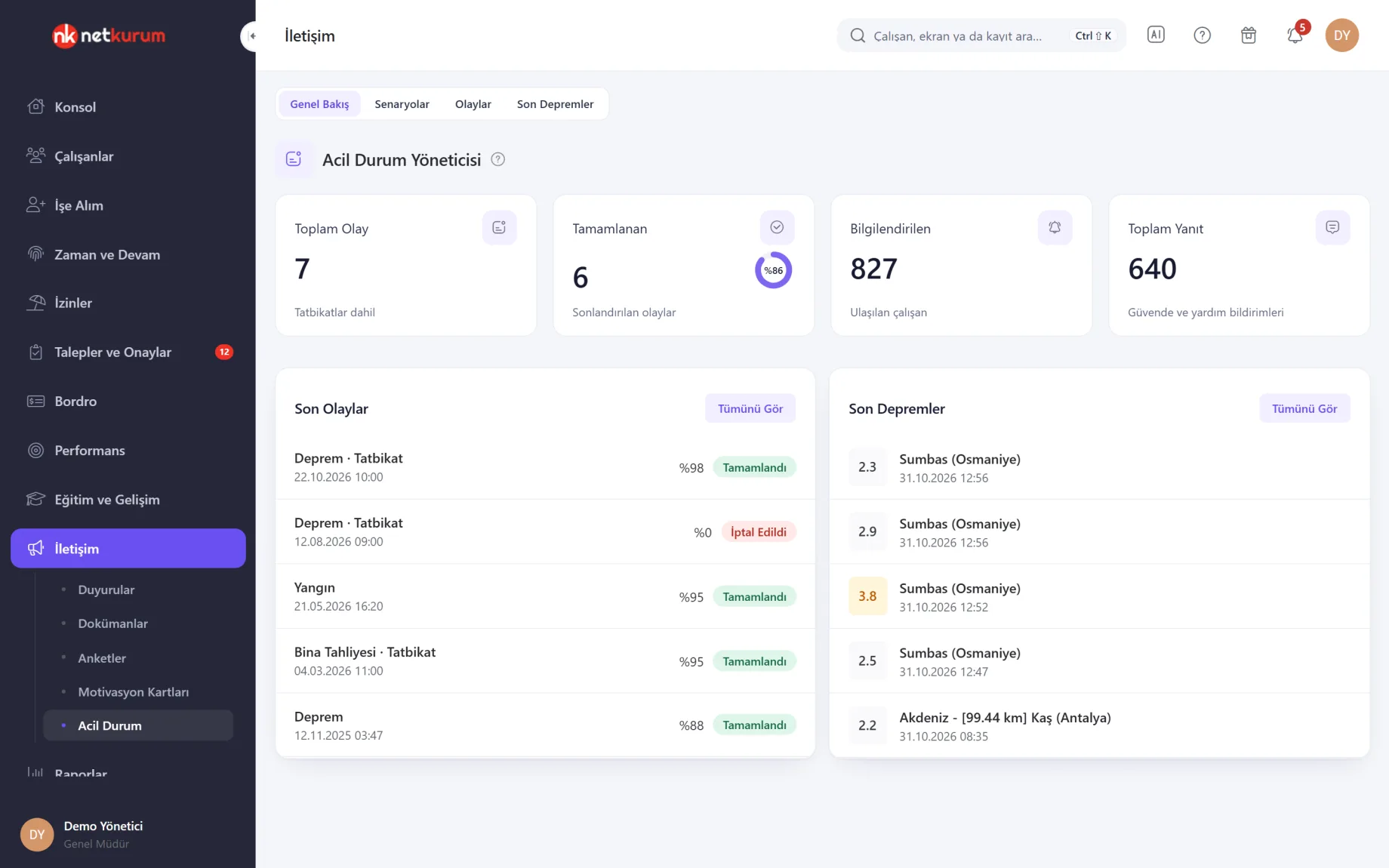
Four cards show events triggered so far (drills included), completed events, employees notified and replies received. Below, the latest five events appear with their response rate, next to the latest earthquakes.
See details
The account owner manages everything, authorized users manage scenarios and events, and employees see only the Earthquakes screen.
Click a recent event to open its details. Drills stay in the event list with a Drill label.
NetKurum never starts a scenario or sends SMS on its own when an earthquake happens; the decision to trigger is yours.
- Cards: total events, completed, notified, total replies
- Lists: latest events, latest earthquakes
Scenario and SMS keyword
Scenarios
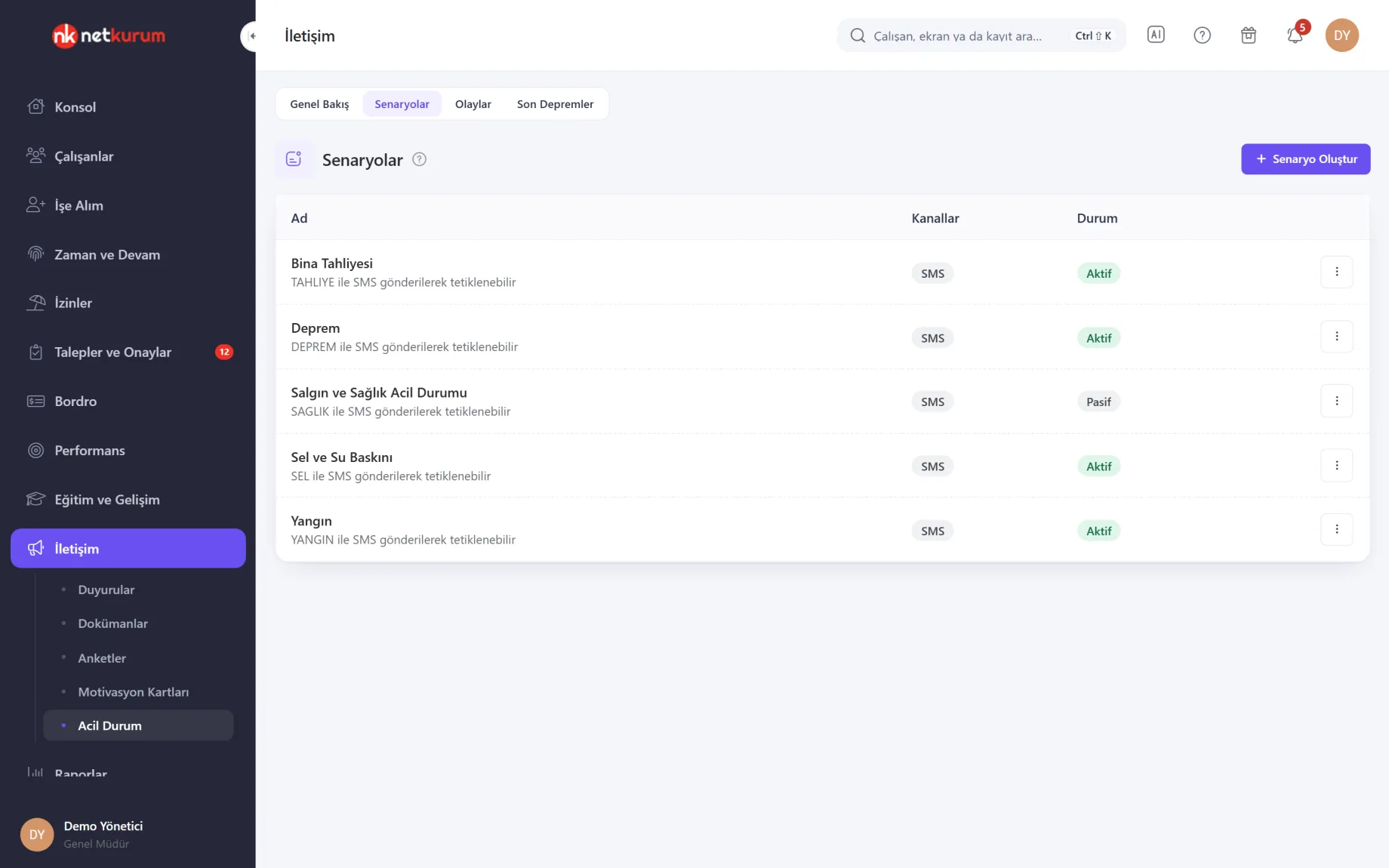
Scenarios such as building evacuation, earthquake, fire and flood are listed with channel and status, and each row shows the keyword that starts it by SMS. Edit, trigger or deactivate from the row menu.
See details
A scenario that has been triggered at least once cannot be deleted, so past events keep their record.
When triggering, choose the target (all employees or selected provinces) and the type (real emergency or drill); the number of people reached shows immediately. A real emergency asks for a second confirmation.
SMS goes only to active employees with a valid mobile number. An employee's province comes from their address, or from their branch's province. Triggering is open to the account owner and authorized users with SMS trigger permission.
- Target: all employees or several provinces
- Type: real emergency or drill
A five-step wizard
Scenario wizard
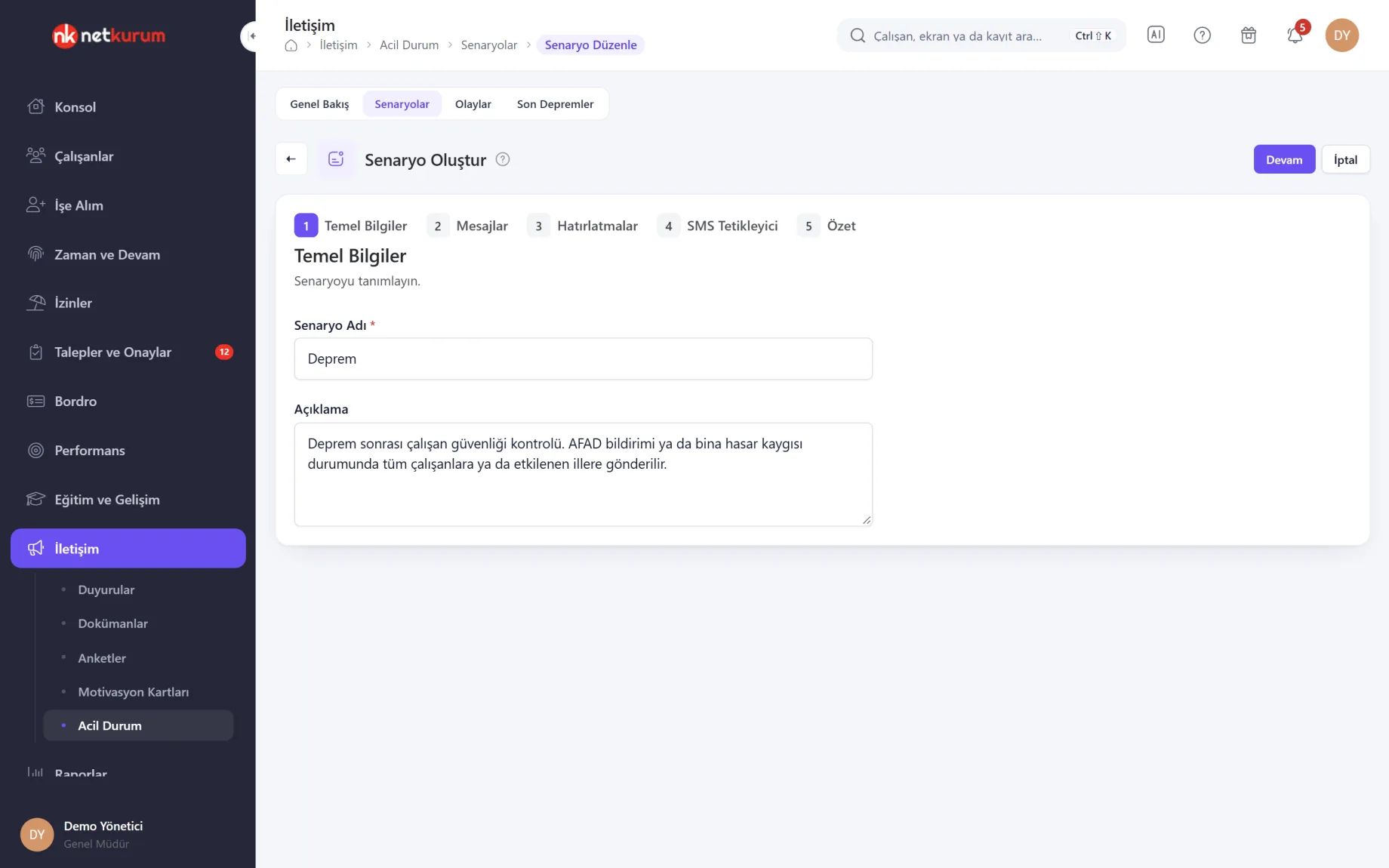
A scenario is built in five steps: basics, messages, reminders, SMS trigger, summary. Messages can use the employee's name, the company name and a one-tap reply link as variables.
See details
You prepare the scenario once; in an emergency you only trigger it.
There are four messages: alert, safe, not safe and reminder, written separately in Turkish and English; an empty message falls back to the template in settings. Each message is up to 160 characters.
Reminders run every 5 minutes to every 3 hours, with up to 10 reminders (default every 30 minutes, at most 3). The SMS trigger takes one keyword and the authorized people allowed to start the scenario with it.
- Steps: basics, messages, reminders, SMS trigger, summary
- Languages: Turkish and English
Safe, need help, no reply
Event details
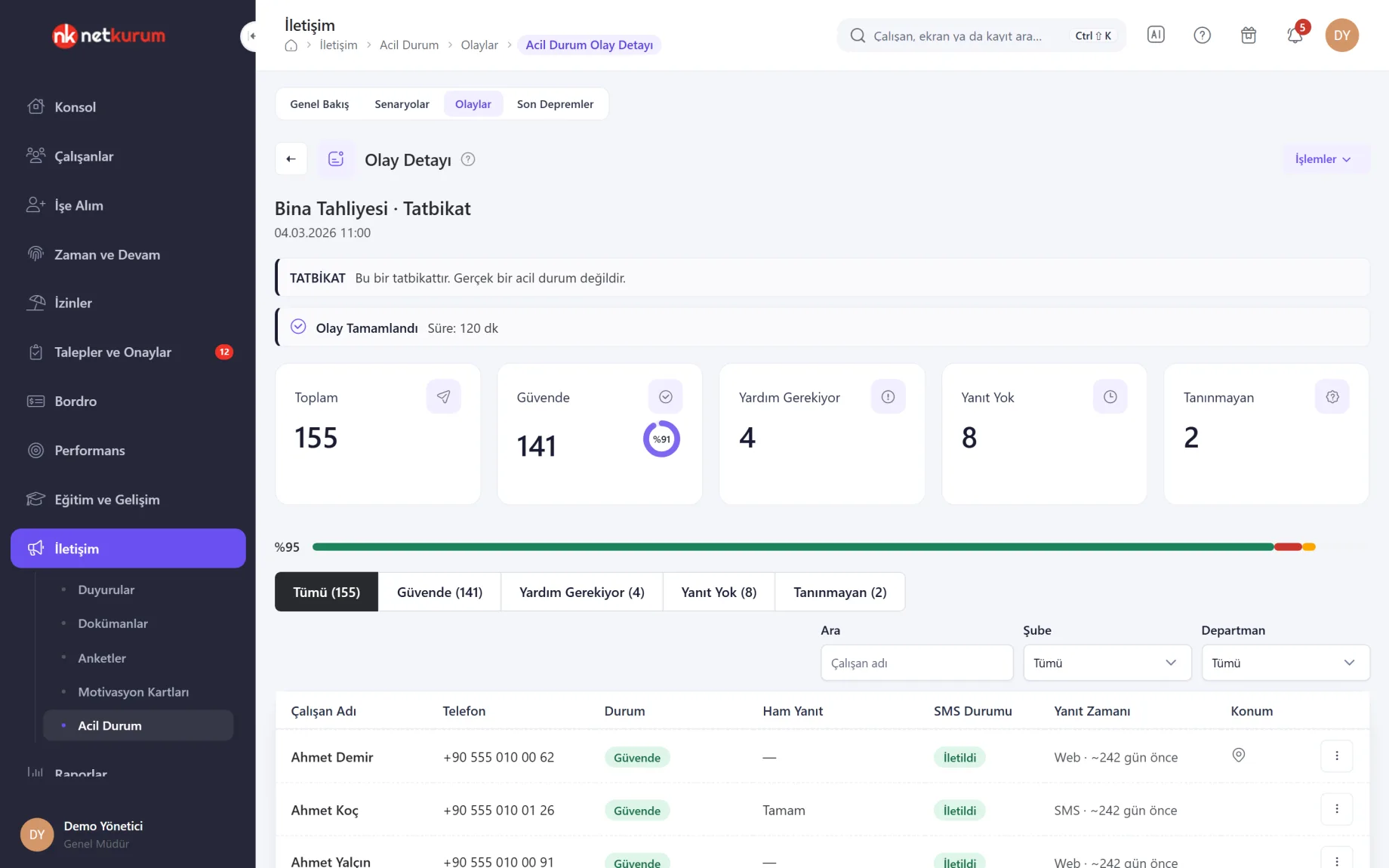
While an event runs, the screen refreshes every few seconds; cards count total, safe, need help, no reply and unrecognized replies, and a bar shows the split. Each person's row shows their status, the raw text they sent, SMS status, reply time and channel (SMS or link) and, if shared, their location.
See details
When more people need help than are safe, the screen opens on the Need Help tab first.
A reply that matches no keyword is marked unrecognized; read it and correct the status by hand, and the row shows who changed it. The row menu also gives access to the employee's emergency contacts.
Resending SMS works only while the event is running. Close the event with End; an event left open completes automatically after 48 hours. The Excel report can be downloaded while the event is still running.
- Tabs: all, safe, need help, no reply, unrecognized
- Filter: name, branch, department
- Actions: end, cancel (drills), download Excel
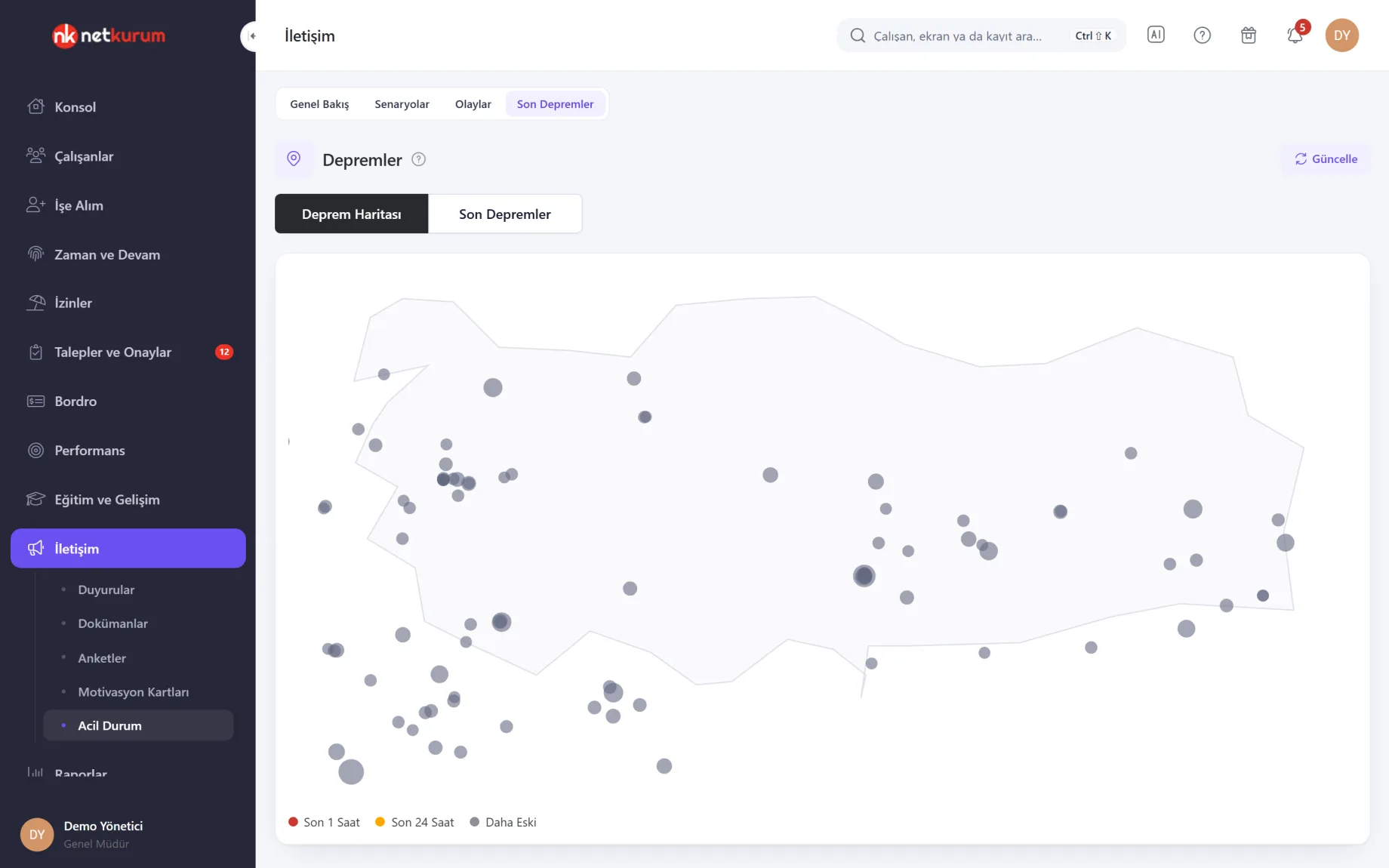
Earthquakes of the last 7 days
Recent earthquakes
Earthquakes in Türkiye over the last 7 days appear on a map and in a list; the dot colour tells you whether a quake was in the last hour, the last 24 hours or earlier. Click a dot for magnitude, depth, time and source.
See details
Data comes from AFAD (Disaster and Emergency Management Authority), and everyone, employees included, can see this screen.
The map is drawn locally with no external map server. When you trigger a scenario, the latest quakes are listed and clicking one adds its province to the target.
Earthquake data is display only; no scenario starts by itself.
- Views: earthquake map and list
- Source: AFAD
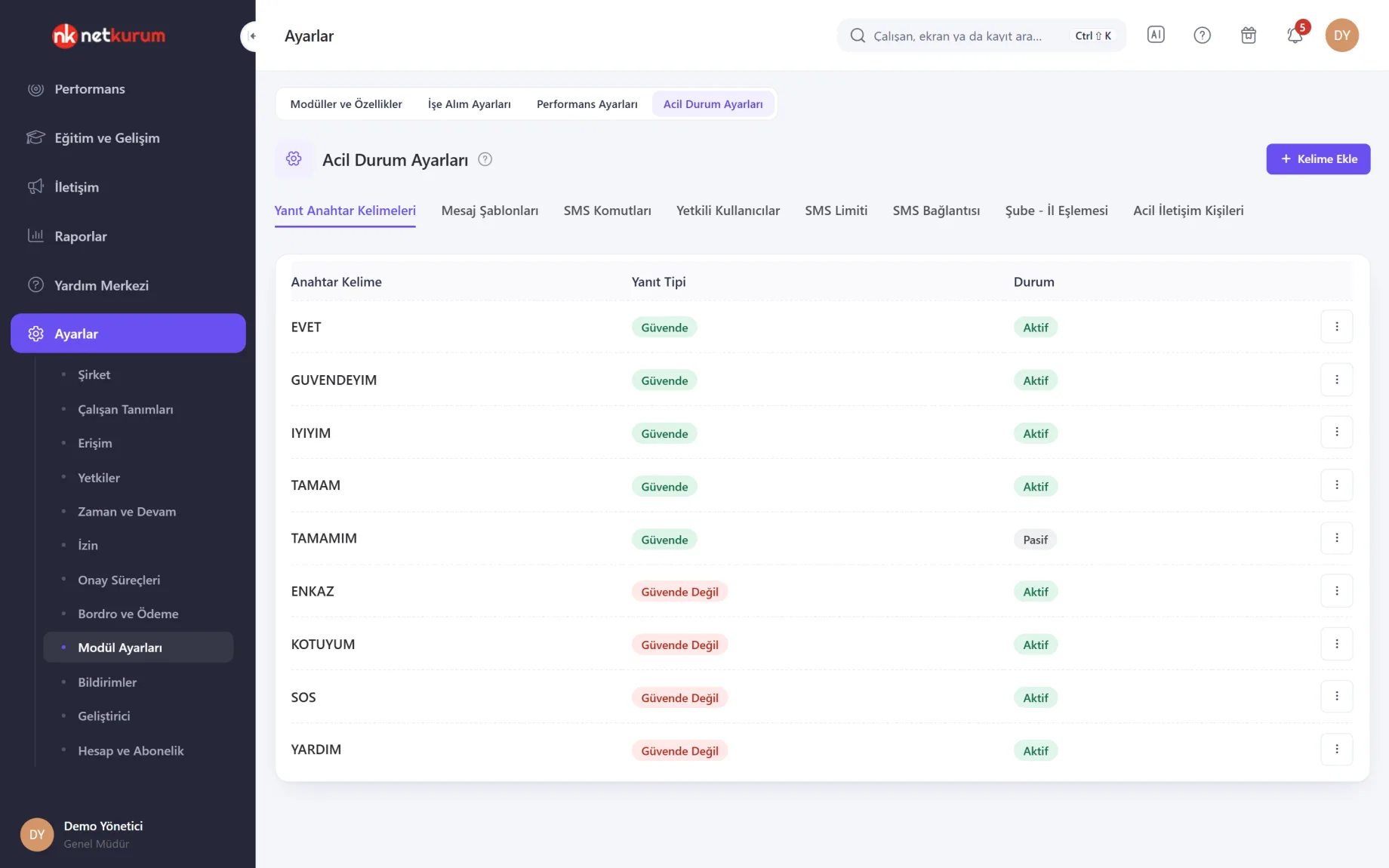
Reply keywords
Emergency settings
Employees' SMS replies are matched against keywords: 1 for safe and 2 for not safe are built in, and words such as EVET, TAMAM, YARDIM or ENKAZ are added as keywords. Turkish characters match automatically (GÜVENDEYİM = GUVENDEYIM).
See details
Authorized users are separately allowed to trigger by SMS and to receive "not safe" alerts.
Other tabs: default message templates for new scenarios, a read-only list of SMS commands, authorized users, monthly SMS limit and credit, the SMS provider's delivery report and inbound SMS address, branch-to-province mapping and emergency contacts.
Branch-to-province mapping places an employee with no province in their address under their branch's province for province-based targeting.
- Reply types: safe, not safe
- Permissions: SMS trigger, receive alerts
What's included in emergency management?
- Prepared emergency scenarios and a five-step wizard
- Alert, safe, not safe and reminder messages in Turkish and English
- Trigger for all employees or selected provinces, with real emergencies and drills kept apart
- Offline triggering by an authorized person sending the keyword by SMS
- Replies by SMS, by one-tap link, or "I'm safe / need help" in the current mobile app version
- Live event details: safe, need help, no reply, unrecognized
- Automatic reminder SMS to people who have not replied
- Manual status correction, SMS resend and an Excel event report
- Employees' emergency contacts available from the event screen
- Map of the last 7 days of earthquakes from AFAD
- Reply keywords, SMS limit and authorized users
How do you get started?
- Connect the SMS provider Enter the SMS provider account and register the delivery report and inbound SMS address from Emergency Settings in your provider's panel.
- Name the responsible people Choose who can trigger scenarios and who receives "not safe" alerts.
- Prepare scenarios Write messages, reminders and the SMS keyword for earthquake, fire, evacuation and other scenarios.
- Run a drill Trigger a scenario as a drill, check the response rate in the event details and fill in missing phone numbers.
Frequently asked questions
Does NetKurum send SMS automatically when an earthquake happens?
No. Earthquake data is display only; the decision to trigger belongs to the account owner and authorized users with SMS trigger permission. Clicking a recent quake only selects the target province.
How do employees reply?
They reply to the SMS with 1, 2 or a defined keyword, or tap the link in the message. In the current version of the mobile app, an active event shows in the app and the employee picks "I'm safe" or "need help", optionally sharing their location.
How do we start a scenario without internet access?
Give the scenario an SMS trigger. When an authorized person sends the keyword by SMS from their registered phone number, the scenario starts.
Are drills kept apart from real events?
Yes. Choose drill as the type when triggering; the event is recorded with a Drill label, needs no second confirmation and can be cancelled while running.
What happens to employees who do not reply?
Based on the scenario's reminder settings, non-responders get another SMS. The No Reply tab in the event details lists them with phone numbers, and failed messages can be resent.
Related features
-
 Communication, Announcements and Documents
Targeted announcements with read tracking, acknowledged company documents, motivation cards and notification settings. Review Now
-
 Mobile App
Check-in, requests, leave balance, payslips, announcements and approvals in every employee's pocket. Review Now
-
 Company Structure and Subcontractors
Holding, companies, sites, departments and the position tree, plus subcontractors and person types. Review Now
Try NetKurum in your organization
Create your own demo in minutes and explore an organization full of sample data for 14 days.