

Features
Card Access and Turnstiles
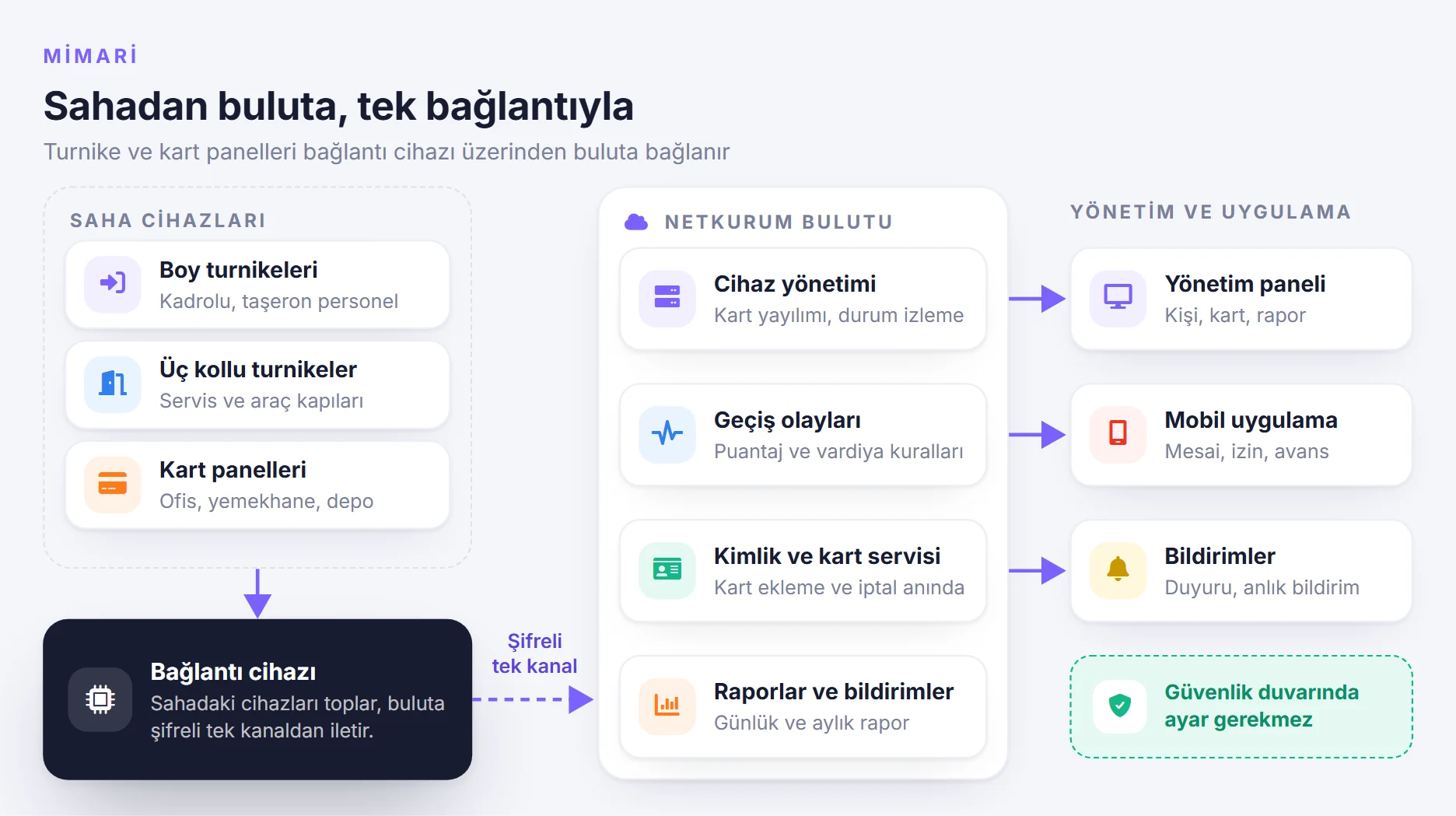
Connect the turnstiles and card reader panels on your sites to the cloud without a static IP, NAT rule or port forwarding; card enrollment and revocation reach the devices within seconds.
What does it solve?
Card access devices often work on their own on site: cards are enrolled locally and records are collected at the end of the period. NetKurum connects these devices to a single, centrally managed event stream.
- The hassle of static IPs and port settings Internet at construction sites and branches usually comes through a modem or a mobile line. Because the connection device opens a single encrypted outbound channel to the cloud, no port forwarding, NAT rule or firewall setting is needed on the modem.
- Slow card enrollment and revocation A card is sent to the devices at the authorized access points as soon as it is enrolled; the card of a person who leaves or is deactivated is removed just as quickly.
- Connection outages When the internet goes down, passages are kept on the device and transferred to the cloud when the connection returns; no records are lost.
- Different devices, separate records Full-height turnstiles, tripod turnstiles, card reader panels and mobile passages are combined in the same event stream; timesheets and reports are calculated from a single source.
- Permissions team by team Access permission, time restrictions and shifts are granted through person groups; a person added to a group automatically receives the group's permissions.
Card access, screen by screen
The visuals are illustrations based on NetKurum screens; person and company names are examples.
Authorized access points
Card enrollment
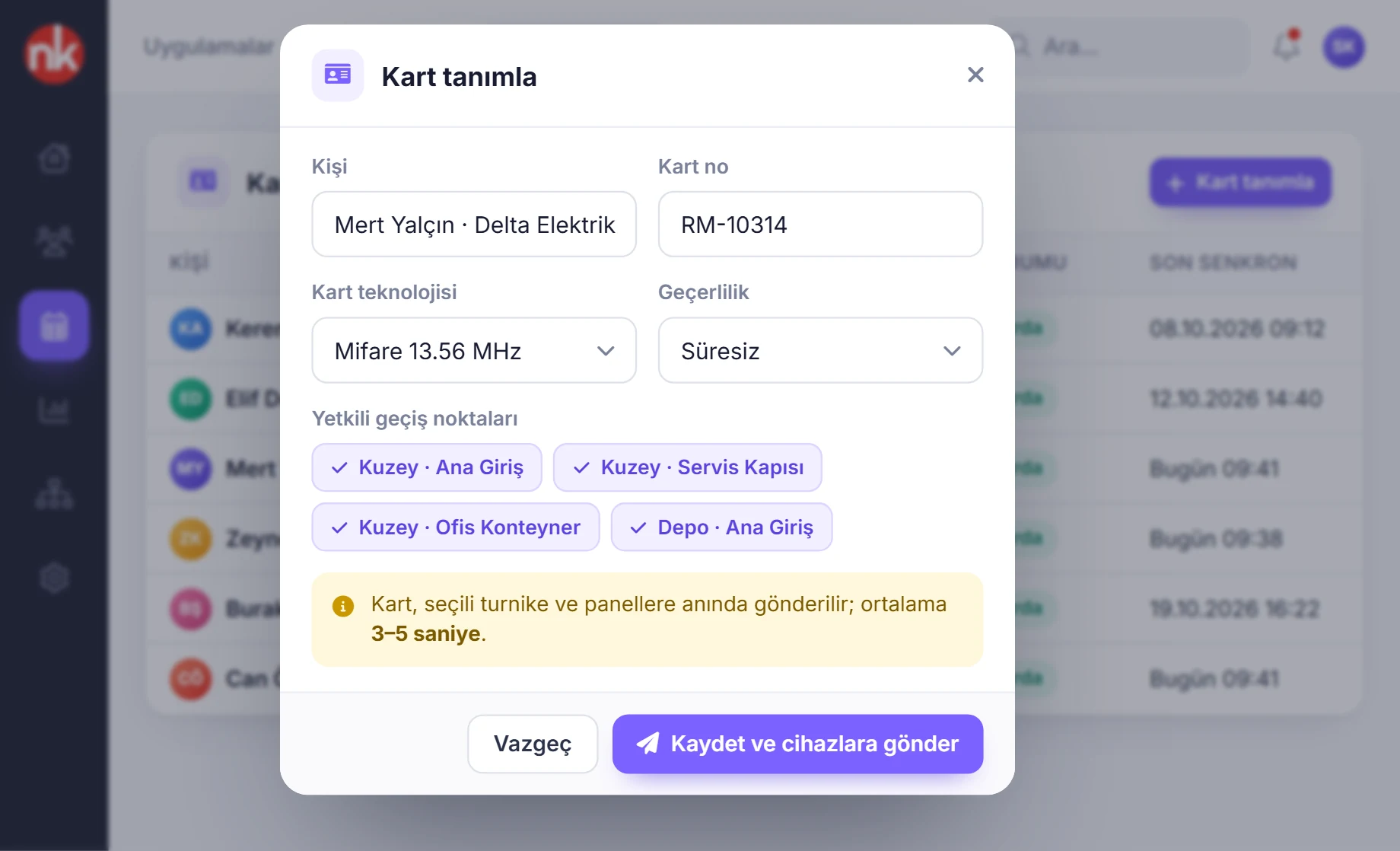
A card is linked to a person, a card technology and authorized access points; as soon as it is saved, it is sent to the relevant turnstiles and panels. The card list shows each card's status on the devices and its last sync time.
See details
The card enrollment screen manages the card's entire life cycle: the card is linked to a person and access points, goes to the devices, and the card of departing staff is withdrawn from the site.
In the window you select the person, card number, card technology, validity and authorized access points. The Save and send to devices button delivers the card to the devices at the selected points.
The summary boxes at the top show the number of enrolled cards, cards added and removed today, and cards awaiting sync. With bulk card upload, many cards can be enrolled at once.
- Links: person, card number, technology, validity, access points
- Propagation: a saved card reaches the devices within seconds
- Monitoring: status on the device and last sync
Resend cards
Device management
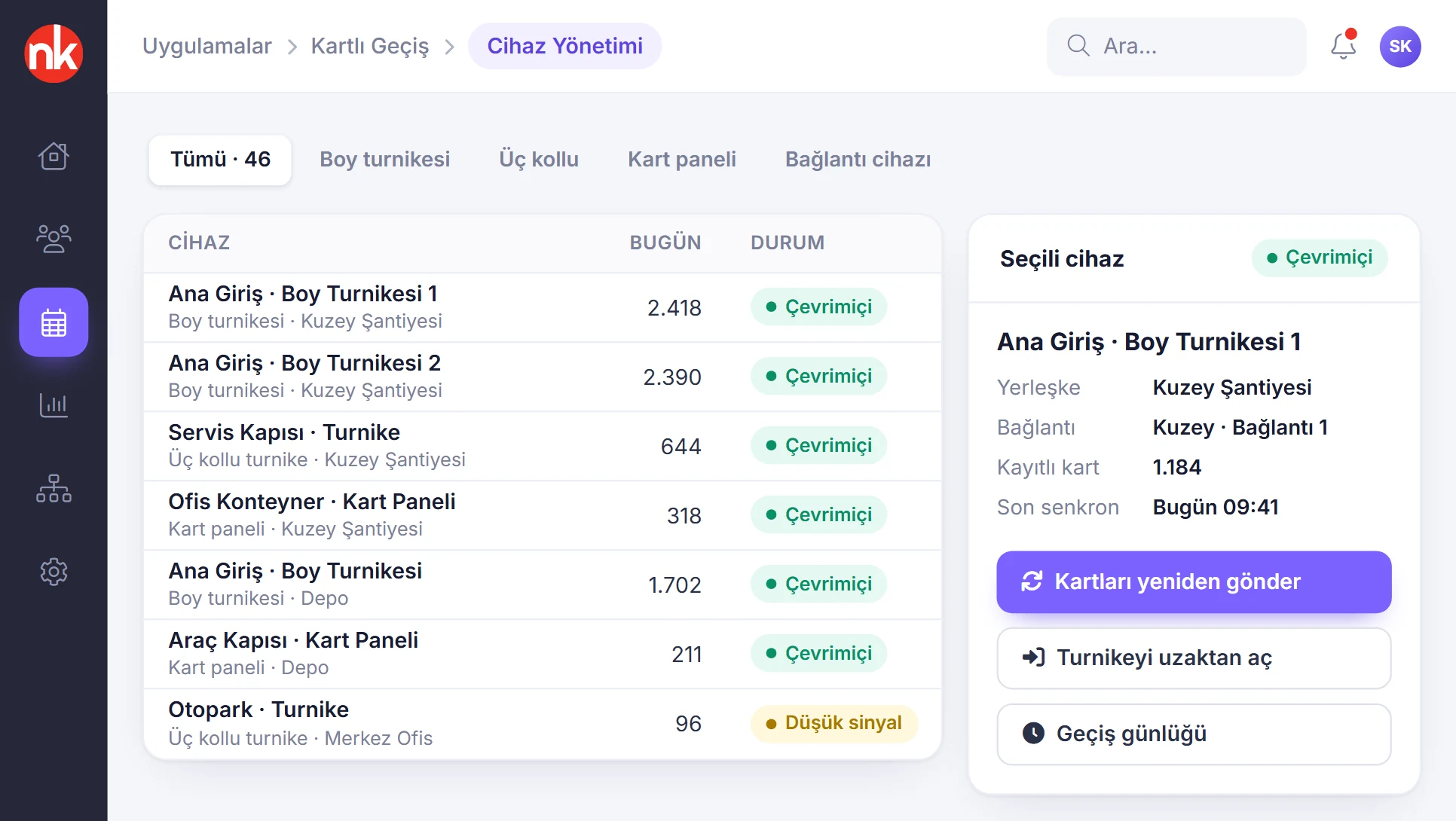
Full-height turnstiles, tripod turnstiles, card reader panels and connection devices are listed by site. Online status, today's passage count, number of stored cards and last sync are monitored; cards can be resent to the selected device.
See details
Device management gathers all access hardware on site in a single list; which device is online and when it last synchronized can be seen centrally.
The list shows each device's type, site, daily passage count and status. When a device is selected, the connection device it is attached to, its number of stored cards, its direction and its software version open in the right panel.
For the selected device, resending cards, opening the turnstile remotely and viewing the passage log are available in the same panel.
- Device types: full-height turnstile, tripod turnstile, card reader panel, connection device
- Status: online, low signal, last sync
- Intervention: resend cards, open remotely, passage log
The group's permissions and hours
Person groups
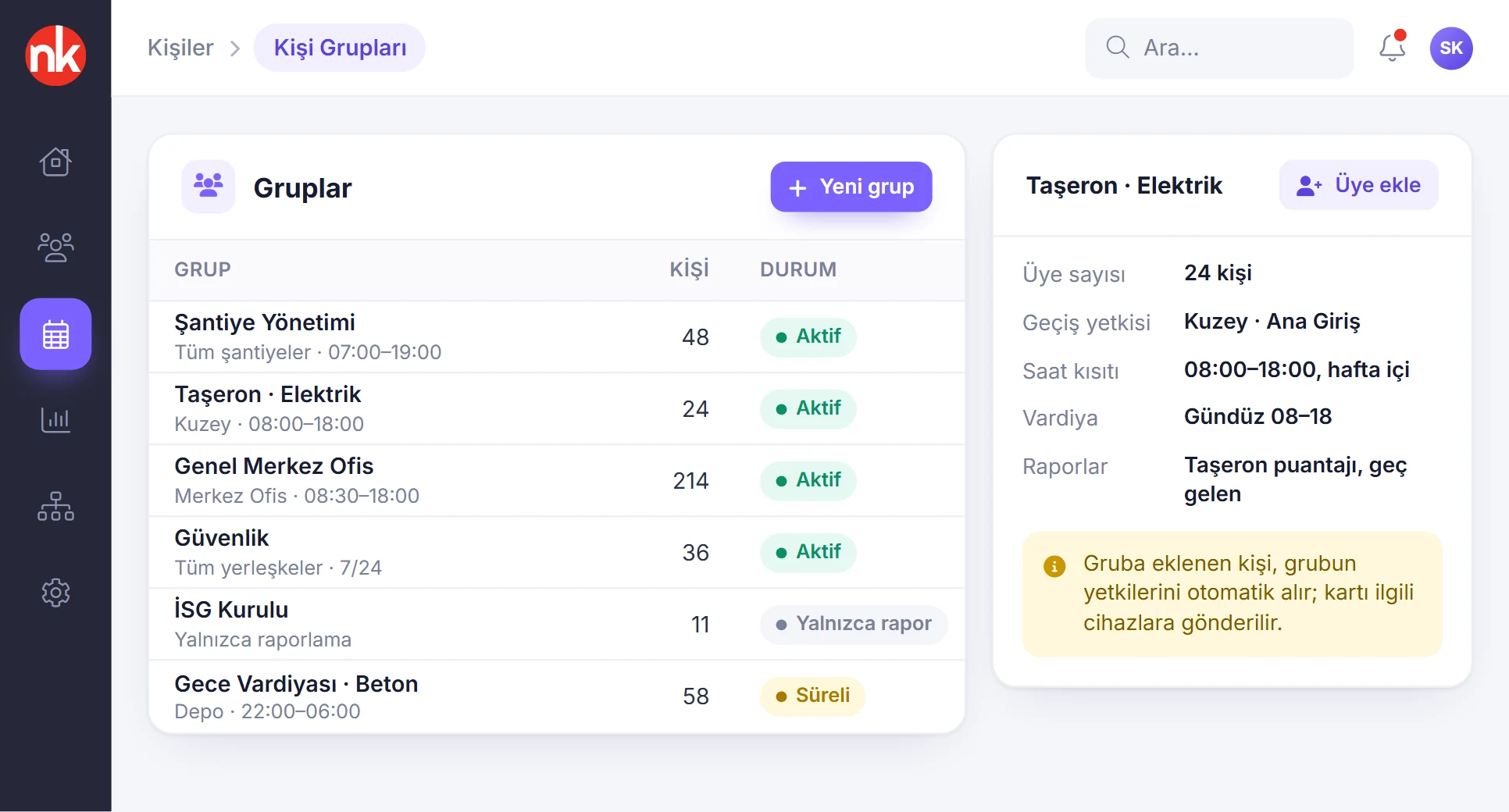
Access permission, time restrictions, shifts and reporting are managed through person groups. A person added to a group automatically receives the group's permissions; their card is sent to the relevant devices.
See details
Person groups let you manage access permission team by team rather than person by person.
For each group, authorized sites and a time range are defined; for example, a subcontractor team can pass only through certain gates and at certain hours. The group's shift and the reports it appears in are also kept in the group.
The group details list the number of members, access permission, time restriction and the members with their card numbers. When a new member is added, their card is automatically sent to the group's devices.
- Defined in the group: site, time restriction, shift, reports
- Membership: a person added to the group receives its permissions automatically
- Status: active, time-limited, report only
Device and direction in the live stream
Manager console
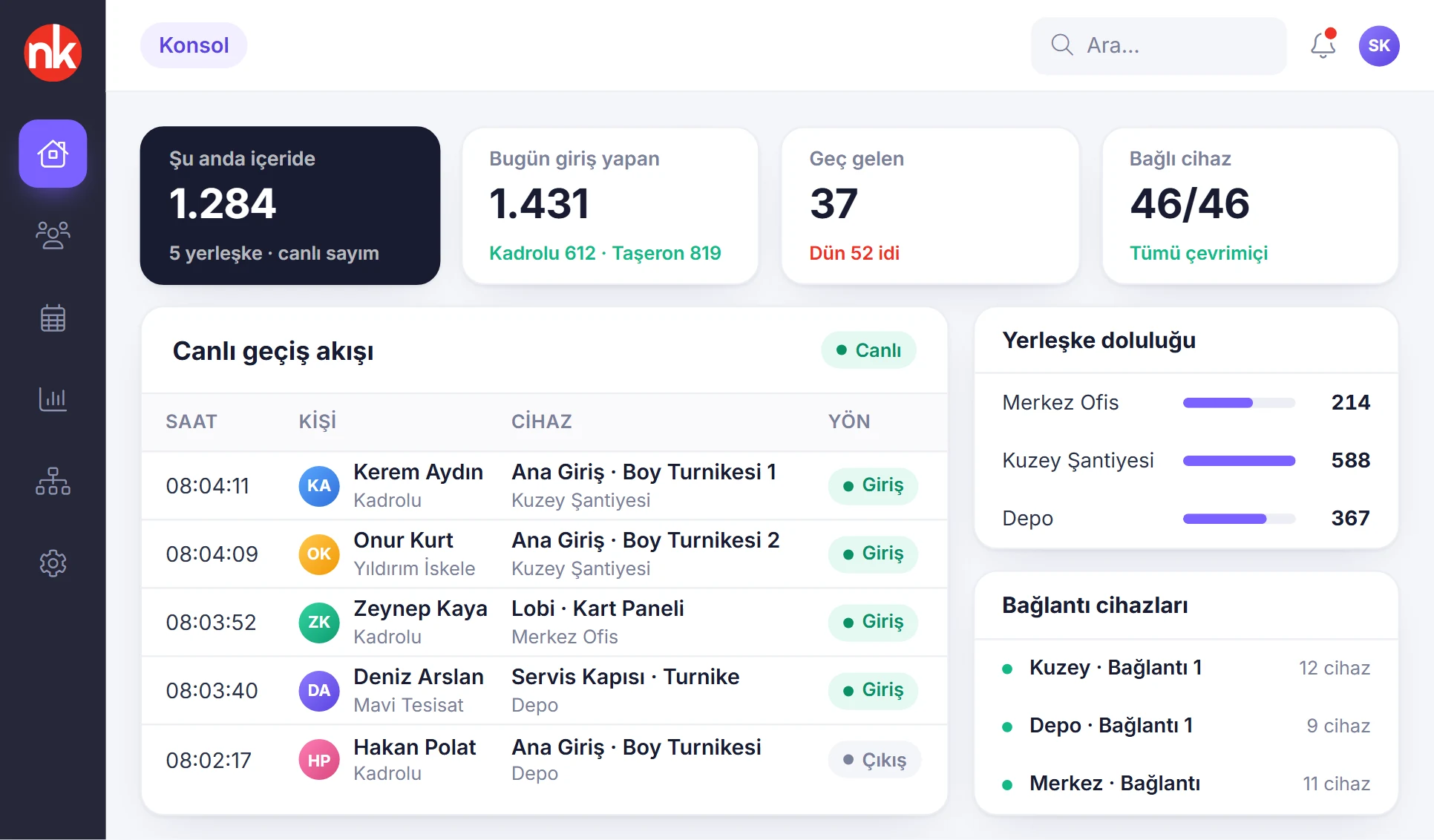
The number of people currently inside, the day's check-ins, late arrivals and connected devices on a single screen. Passages from turnstiles and panels appear in the live stream; site occupancy and the status of connection devices are monitored alongside.
See details
The console lets a manager who opens the panel see at a glance who is inside right now and whether the devices on site are working properly.
The live passage stream shows the time, person, site, device and direction of each passage; mobile QR passages also appear in the same stream.
Site occupancy bars compare the current number of people at each site. The connection devices list shows how many readers each device is connected to and its latency.
- Summary: inside, checked in today, late, connected devices
- Live stream: time, person, site, device, direction
- Health: status of the connection devices
Access policy
Site details
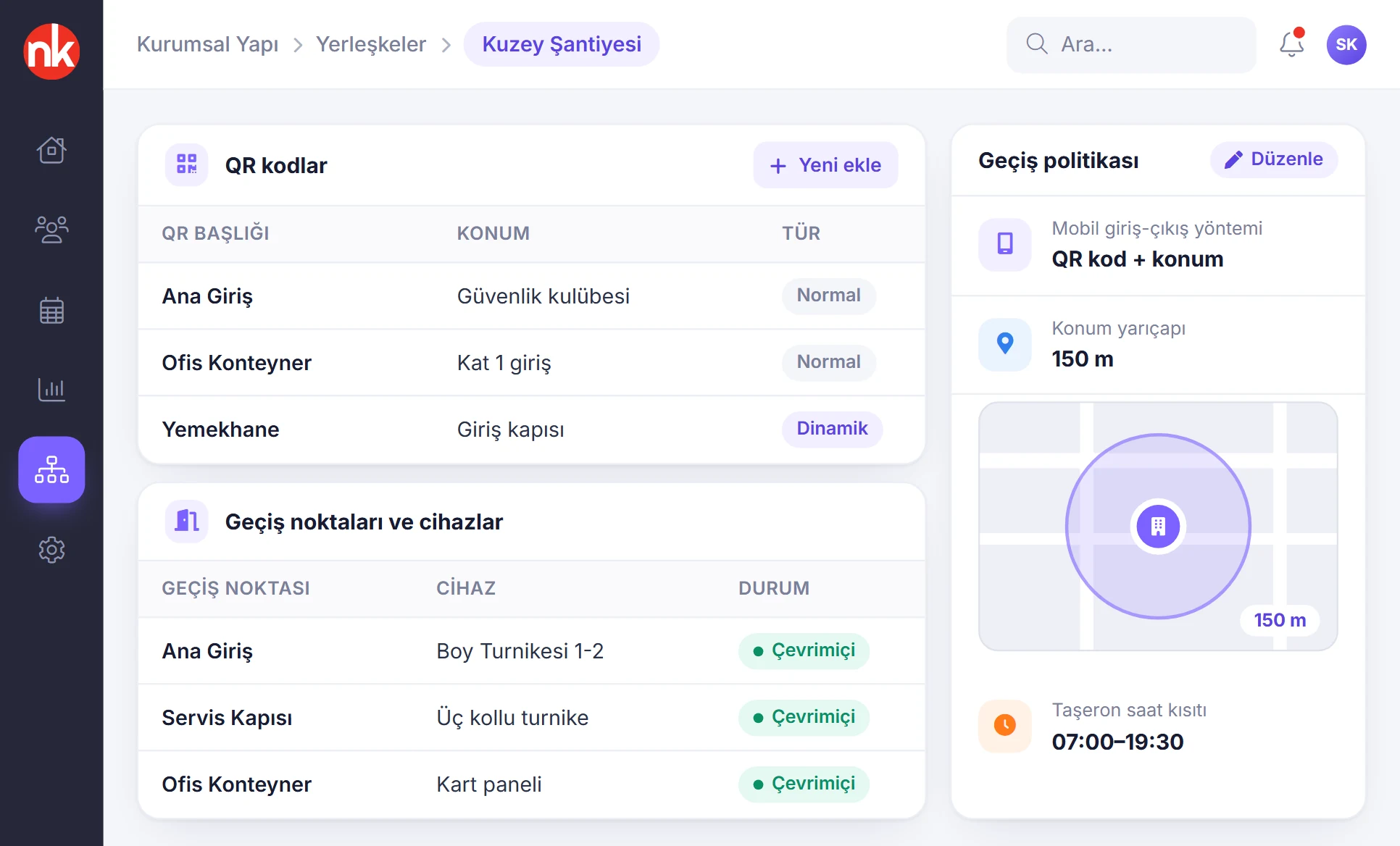
A site's access points and devices, QR codes, mobile check-in/out method, location radius and subcontractor time restriction are managed on the same page.
See details
Site details define on a single page how a site is entered and exited.
The boxes at the top summarize the number of registered people, those currently inside, the number of access points and the mobile access method.
The QR codes table lists normal and dynamic codes; the access points table shows each gate's device and status. The access policy box holds the settings for the mobile method, location radius, access from a different site and card propagation.
- QR codes: normal and dynamic
- Access points: gate, device, status
- Policy: mobile method, location radius, time restriction
What does card access include?
- Support for full-height turnstiles, tripod turnstiles and card reader panels
- Cloud connection without opening ports, through the connection device developed by Karatsoft
- No static IP, NAT rule, port forwarding or firewall setting required
- Passages kept on the device during a connection outage and transferred afterwards
- Card enrollment and revocation reaching the devices within seconds
- Bulk card upload
- Device management: online status, number of stored cards, last sync
- Resending cards and opening turnstiles remotely
- Access permission, time restrictions and shifts through person groups
- The access point stored in every passage record
- Card and mobile passages combined in the same timesheet
- Live passage stream and site occupancy
How does it work?
- Install the devices Turnstiles and card reader panels are installed on site and connected to the local network.
- Plug in the connection device The connection device gathers the readers on site and opens an encrypted outbound channel to the cloud; no modem settings are needed.
- Enroll the cards Link cards to people and access points, or grant permissions with person groups; cards reach the devices within seconds.
- Monitor centrally Passages appear in the live stream, the timesheet and reports; device status is tracked centrally.
Frequently asked questions
Do we need a static IP or port forwarding on site?
No. The connection device opens a single encrypted outbound channel to the cloud. As a result, no port forwarding, NAT rule, firewall setting or static IP is needed on the modem; it also works on construction site internet that comes over a mobile line.
Are passages lost if the internet goes down?
No. During a connection outage, passages are kept on the device and transferred to the cloud when the connection returns.
When is the card of a departing employee deactivated?
When the person is deactivated or their card is revoked, the card is removed from the relevant devices within seconds.
Which device types are supported?
Full-height turnstiles, tripod turnstiles and card reader panels connect to the cloud through the connection device. Passages made with the mobile app using QR and location verification also flow into the same event stream.
Can card access and mobile check-in be used together?
Yes. For example, a turnstile can be used at the construction site entrance and the mobile app for office staff; all passages are combined in the same timesheet and the same reports.
Related features
-
 Check-In/Out Management
Employees scan the branch QR code or verify their location; the record is in the panel instantly. You pick the method per site. Review Now
Check-In/Out Management
Employees scan the branch QR code or verify their location; the record is in the panel instantly. You pick the method per site. Review Now
-
 Organizational Structure and Subcontractors
Sites, departments, position hierarchy, subcontractor companies and person types. Review Now
Organizational Structure and Subcontractors
Sites, departments, position hierarchy, subcontractor companies and person types. Review Now
-
 Reporting
Daily, monthly and advanced reports; scheduled email delivery. Review Now
Reporting
Daily, monthly and advanced reports; scheduled email delivery. Review Now
Try NetKurum in your organization
Request your free trial; our team will contact you to set up your account.